
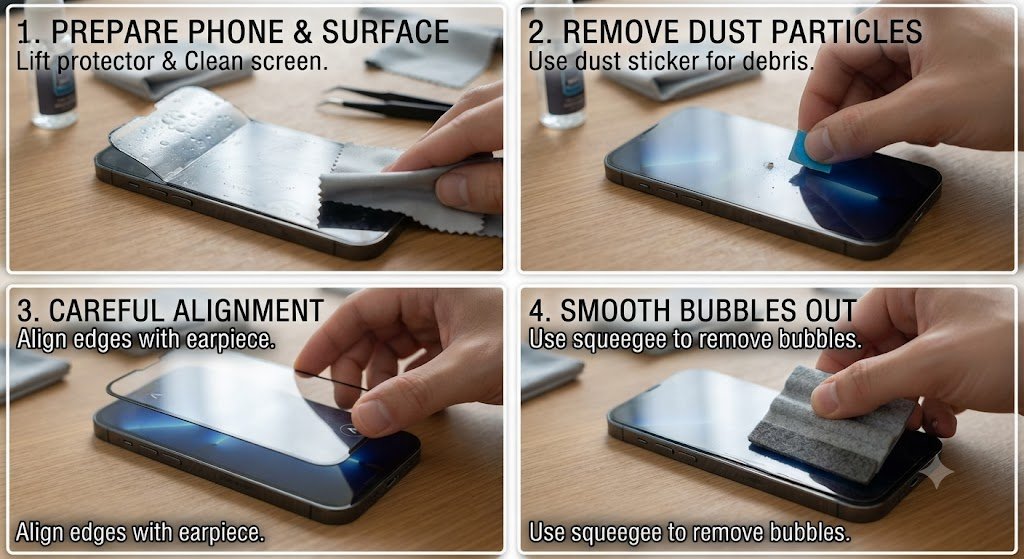
A damaged or poorly installed screen protector can make even a brand-new phone feel frustrating to use. If you notice air bubbles, dust spots, lifted corners, or a protector that keeps peeling away, learning how to fix a screen protector can save you the cost of buying a replacement. In many cases, the problem is not the protector itself but incorrect installation, trapped particles, or pressure damage.
A screen protector plays an important role in protecting your phone display from scratches, fingerprints, minor impacts, and daily wear. However, even high-quality tempered glass or film protectors can develop issues over time.
The good news? Many common problems can be corrected at home with simple tools and careful techniques. This guide explains how to fix a screen protector properly, whether you are dealing with bubbles, edge lifting, dust underneath, cracks, or installation mistakes.
Why Do Screen Protectors Have Problems?
Before learning how to fix a screen protector, it helps to understand why these issues happen in the first place.
Most screen protector problems come from a few common causes:
- Dust particles trapped under the protector
- Improper alignment during installation
- Air pockets caused by uneven pressure
- Dirty phone display before application
- Low-quality adhesive
- Curved screen compatibility issues
- Heat, moisture, or repeated phone use
A screen protector is designed to create a smooth protective layer over your display. When the adhesive does not bond evenly, visible imperfections appear.
Even a tiny piece of dust can create a noticeable bubble because the protector cannot fully contact the screen surface around that particle.
How to Fix a Screen Protector With Air Bubbles
Air bubbles are the most common issue after installing a new protector. Fortunately, they are usually the easiest problem to solve.
Small bubbles caused by trapped air often disappear naturally within 24 to 48 hours. Larger bubbles require manual removal.
Method 1: Push Air Bubbles Toward the Edge
This method works best for fresh installations.
Steps:
- Turn off your phone.
- Place it on a flat, clean surface.
- Use a microfiber cloth or soft card.
- Press gently on the bubble.
- Push the trapped air toward the nearest edge.
Avoid pressing too hard because excessive pressure can damage the adhesive layer or create new lifting areas.
For tempered glass protectors, slow and consistent pressure usually works better than forcing the bubble out quickly.
Method 2: Lift the Protector Slightly and Reapply
If a bubble refuses to disappear, the issue may be caused by dust or uneven installation.
Carefully lift the closest corner of the screen protector using:
- A plastic card
- A fingernail
- A thin piece of tape
Do not use sharp metal objects because they can scratch the phone display or damage the protector.
Once lifted:
- Inspect the area underneath.
- Remove any dust particles.
- Lower the protector slowly.
- Press from the centre outward.
This technique is one of the most effective answers when people search for how to fix a screen protector with stubborn bubbles.
How to Fix a Screen Protector With Dust Underneath
Dust underneath a protector creates small circular bubbles that usually do not disappear.
Unlike air bubbles, dust particles physically block the adhesive from touching the screen.
Removing Dust From Under a Screen Protector
Follow these steps carefully:
Step 1: Prepare Your Workspace
Before removing anything:
- Wash your hands.
- Clean your work surface.
- Avoid windy areas.
- Turn off fans nearby.
A bathroom after a hot shower is often a good environment because humidity reduces floating dust particles.
Step 2: Lift the Protector
Raise only the section near the dust spot. Do not completely remove the protector unless necessary.
Step 3: Remove the Dust
Use a small piece of cleaning tape to pick up the particle.
Avoid touching the adhesive side with your fingers because fingerprints can create additional problems.
Step 4: Reapply Slowly
Lower the protector carefully and smooth it from the middle outward.
How to Fix a Screen Protector That Is Peeling at the Edges
Edge lifting is another common complaint, especially with curved smartphones.
A screen protector may start peeling because:
- The phone case pushes against the edges.
- The adhesive has weakened.
- The protector is incorrectly sized.
- Oil or dirt has collected around the border.
Quick Fix for Lifted Edges
Try these steps:
- Remove the phone case.
- Clean the edge area.
- Press the lifted section firmly for several seconds.
- Leave the phone untouched for a few hours.
Sometimes the adhesive simply needs time to reconnect.
However, if the edge repeatedly lifts, the adhesive layer may be damaged and replacement may be necessary.
How to Fix a Screen Protector After Wrong Installation
Installing a protector incorrectly does not always mean it must be thrown away.
If the protector was recently applied and the adhesive is still clean, you may be able to reposition it.
Safe Repositioning Process
Follow this method:
- Carefully remove the protector.
- Place it adhesive-side up.
- Clean the phone screen completely.
- Realign the protector.
- Apply gentle pressure.
Never place the protector face-down on dusty surfaces because the adhesive side can collect particles quickly.
How to Fix a Screen Protector With Cracks
A cracked screen protector is different from bubbles or alignment problems.
Tempered glass protectors are designed to absorb impact. When they crack, they have already performed their protective function.
Signs that replacement is needed:
- Large cracks across the protector
- Sharp edges
- Missing glass pieces
- Touch sensitivity problems
Trying to repair cracked tempered glass is not recommended because the protective structure has already been compromised.
How to Fix a Screen Protector That Is Not Sticking
Sometimes a protector appears fine at first but slowly loses adhesion.
Common causes include:
- Excessive fingerprints
- Moisture exposure
- Weak adhesive quality
- Repeated removal and installation
Solutions
Clean the Screen Properly
Use:
- Microfiber cloth
- Screen cleaning solution
- Dust removal stickers
Avoid household cleaners containing ammonia because they may damage screen coatings.
Replace the Protector Adhesive
Some film protectors allow adhesive replacement, but most tempered glass models do not.
If the adhesive layer is damaged, buying a new protector is usually the better solution.
How to Fix a Screen Protector Without Removing It
Many people want a quick solution without taking off the protector.
For minor problems:
Small Air Bubbles
Use a soft card to push bubbles outward.
Fingerprint Marks
Clean the surface with a microfiber cloth.
Slight Edge Separation
Apply gentle pressure after removing the phone case.
Misalignment
Small alignment issues usually require removal and reinstallation.
Trying to force a badly aligned protector into place can make the adhesive uneven.
Tools Needed to Fix a Screen Protector
Having the right tools makes the process safer and easier.
Recommended items include:
- Microfiber cloth
- Dust removal stickers
- Plastic card
- Screen cleaning wipes
- Bright light source
- Clean workspace
- Small piece of masking tape
Professional installation kits often include most of these items because dust control is one of the biggest factors in successful installation.
Common Mistakes When Fixing a Screen Protector
Many people damage their protector while trying to repair it.
Avoid these mistakes:
Using Metal Tools
Knives, needles, or metal blades can scratch the display.
Touching the Adhesive Side
Finger oils reduce sticking performance.
Removing the Protector Too Many Times
Repeated removal weakens the adhesive layer.
Applying Too Much Pressure
Excess force can create cracks or permanent marks.
Cleaning With Incorrect Products
Strong chemicals may damage oleophobic screen coatings.
How to Prevent Screen Protector Problems in the Future
Prevention is easier than repair.
Follow these installation tips:
- Clean the screen twice before applying.
- Install in a low-dust environment.
- Align carefully before pressing down.
- Avoid touching the adhesive surface.
- Use a compatible phone case.
- Choose a high-quality protector.
A properly installed screen protector should feel almost invisible while providing reliable protection.
Tempered Glass vs Plastic Film: Which Is Easier to Fix?
Different protector materials behave differently.
Tempered Glass Protectors
Advantages:
- Better scratch resistance
- Smoother touch experience
- Easier installation
Problems:
- More likely to crack
- Edge lifting can happen on curved screens
Plastic Film Protectors
Advantages:
- Flexible
- Better for curved displays
- Less likely to shatter
Problems:
- Easier to scratch
- More difficult to remove bubbles
Understanding the material helps you choose the correct repair method.
When Should You Replace Instead of Fix a Screen Protector?
Not every issue is worth repairing.
Replacement is recommended when:
- The protector has deep cracks.
- Adhesive is permanently damaged.
- Dust covers a large area.
- Touch response is affected.
- Edges keep lifting repeatedly.
A new protector is usually inexpensive compared with repairing a damaged phone screen.
FAQ: How to Fix a Screen Protector
1. Can air bubbles under a screen protector disappear by themselves?
Yes, small air bubbles may disappear naturally within one or two days after installation. These bubbles are usually caused by trapped air and slowly escape through the edges. However, bubbles caused by dust particles will not disappear because the particle prevents proper adhesion.
2. How do I remove a bubble from a tempered glass screen protector?
To remove a bubble, gently press it with a microfiber cloth or plastic card and push it toward the nearest edge. If the bubble remains, carefully lift the protector near that area, remove any dust, and reapply the glass slowly.
3. Can I reuse a screen protector after removing it?
Sometimes, but it depends on the condition of the adhesive layer. A protector removed carefully in a clean environment may work again, but once dust or fingerprints reach the adhesive surface, the quality of the installation usually decreases.
4. Why does my screen protector keep lifting at the corners?
Corner lifting usually happens because of dirt, moisture, poor adhesive quality, incorrect installation, or pressure from a phone case. Removing the case, cleaning the edges, and applying gentle pressure may solve the issue temporarily.
5. Is it better to fix a damaged screen protector or replace it?
Minor bubbles and alignment issues can often be fixed. However, cracked tempered glass, damaged adhesive, or repeated peeling usually means replacement is the better option because the protector may no longer provide reliable protection.
Final Thoughts: Fix Your Screen Protector the Right Way
Learning how to fix a screen protector does not require professional tools or experience. Most common issues, including bubbles, dust spots, and minor edge lifting, can be corrected with patience and the right technique.
Start by identifying the actual problem. Remove trapped air differently from trapped dust. Handle adhesive surfaces carefully. Avoid rushing the process.
A clean workspace, gentle pressure, and proper alignment are the three things that make the biggest difference. If the protector is cracked or the adhesive has failed completely, replacement is the safest choice.
Take a few extra minutes during installation, and your next screen protector will look cleaner, last longer, and provide better protection for your device.
